

For a long time, exposing homelab or internal corporate services to the public internet meant wrestling with port forwarding, dynamic DNS, and NAT hairpins. Beyond the networking headache, opening ports on your firewall is a massive security risk, inviting automated scanners and DDoS attacks straight to your router.
Enter Cloudflare Tunnels. By creating an outbound connection from your infrastructure to Cloudflare's edge, you can serve web traffic without opening a single inbound port. While you can deploy cloudflared manually, managing tunnels imperatively breaks the GitOps model.
To solve this, we can use the Cloudflare Operator a Kubernetes-native controller that allows us to define and manage Cloudflare Tunnels declaratively using Custom Resource Definitions (CRDs).
Why the Cloudflare Operator?
When running a GitOps pipeline with tools like ArgoCD, you want every aspect of your infrastructure defined as code. Traditional Cloudflare tunnel setups require manually authenticating and creating tunnels via the CLI or dashboard.
The Cloudflare Operator brings this process into Kubernetes:
- Declarative State: Tunnels are defined as YAML files alongside your applications.
- Automated Lifecycle: When the CRD is applied, the operator automatically provisions the tunnel and DNS records.
- Seamless Scaling: You can use standard Kubernetes tools like HPAs (Horizontal Pod Autoscalers) to scale your tunnel replicas based on traffic.
Architecture Flow
Here is a high-level view of how this architecture comes together:
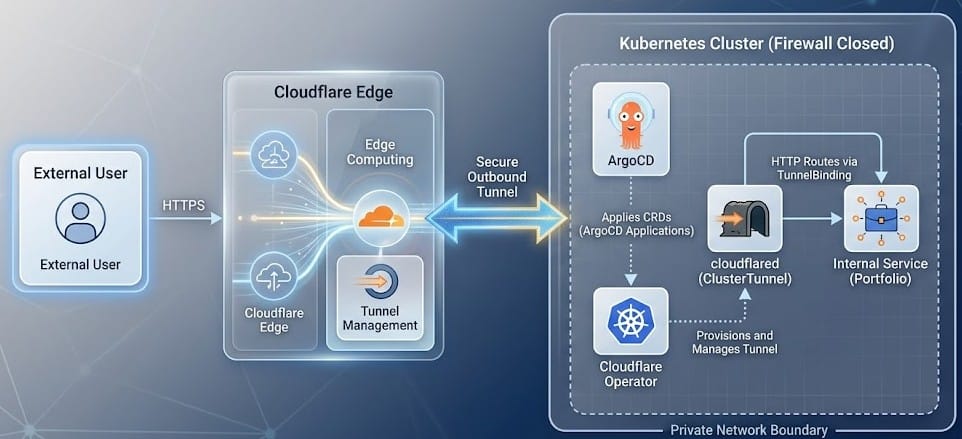
The Implementation
Here is a look at a production-ready ClusterTunnel definition from my infrastructure repository:
apiVersion: networking.cfargotunnel.com/v1alpha2
kind: ClusterTunnel
metadata:
  name: homelab-tunnel-yoganova
spec:
  newTunnel:
    name: homelab-tunnel-yoganova

  # Inject Keel annotations to auto-update cloudflared image
  deployPatch: |
    {
      "metadata": {
        "annotations": {
          "keel.sh/policy": "force",
          "keel.sh/trigger": "poll",
          "keel.sh/match-tag": "true",
          "keel.sh/pollSchedule": "@every 6h"
        }
      },
      "spec": {
        "template": {
          "spec": {
            "containers": [
              {
                "name": "cloudflared",
                "resources": {
                  "requests": {
                    "cpu": "200m",
                    "memory": "32Mi"
                  }
                }
              }
            ]
          }
        }
      }
    }
  cloudflare:
    domain: yoganova.my.id
    accountId: "YOUR_ACCOUNT_ID"
    email: "[email protected]"
    secret: cloudflare-cred
Breaking Down the Configuration
ClusterTunnelKind: Unlike a standardTunnel, aClusterTunneloperates cluster-wide. It allows ingress resources in any namespace to route traffic through this tunnel, which is perfect for a multi-tenant or multi-app cluster.deployPatch: Thev1alpha2API introduceddeployPatch, allowing us to inject custom configurations into the underlying Deployment created by the operator.- I use this to inject Keel annotations. Keel will now automatically poll and update the
cloudflaredimage to the latest secure version without manual intervention. - I also enforce strict CPU and memory requests to ensure the tunnel doesn't starve other cluster resources.
- I use this to inject Keel annotations. Keel will now automatically poll and update the
- Authentication (
cloudflareblock): The operator securely references a Kubernetes Secret (cloudflare-cred) containing the Cloudflare Global API Key or API Token to handle the DNS and Tunnel provisioning.
Scaling for High Availability
Because the Operator translates the ClusterTunnel CRD into a standard Kubernetes Deployment, we can attach a Horizontal Pod Autoscaler (HPA) directly to it:
apiVersion: autoscaling/v2
kind: HorizontalPodAutoscaler
metadata:
  name: homelab-tunnel-yoganova
  namespace: cloudflare-operator-system
spec:
  scaleTargetRef:
    apiVersion: apps/v1
    kind: Deployment
    name: homelab-tunnel-yoganova
  minReplicas: 1
  maxReplicas: 3
  metrics:
    - type: Resource
       resource:
        name: cpu
        target:
          type: Utilization
          averageUtilization: 90
With this HPA, if my services experience a sudden spike in traffic, Kubernetes will automatically spin up additional cloudflared replicas. Since Cloudflare Tunnels support high availability out of the box, the traffic is seamlessly load-balanced across the new replicas.
Binding Services to the Tunnel
Once the ClusterTunnel is established, we need to tell the operator which internal services should be exposed and on what domains. Instead of using a traditional Ingress controller (like Traefik or NGINX), the Cloudflare Operator provides a TunnelBinding CRD.
Here is an example of how I expose my portfolio application directly to the tunnel:
# Portfolio
apiVersion: networking.cfargotunnel.com/v1alpha1
kind: TunnelBinding
metadata:
  name: portfolio-binding
  namespace: services
subjects:
  - name: portfolio
    spec:
      fqdn: yoganova.my.id
      target: http://portfolio.services.svc.cluster.local:80
tunnelRef:
  kind: ClusterTunnel
  name: homelab-tunnel-yoganova
This binding explicitly links the fully qualified domain name (yoganova.my.id) to the internal Kubernetes service DNS (http://portfolio.services.svc.cluster.local:80). It also references the homelab-tunnel-yoganova ClusterTunnel we created earlier. The operator automatically updates Cloudflare's DNS and routing rules, entirely bypassing the need for a separate Ingress controller. You can view this configuration in my portfolio manifest.
The GitOps Workflow in Action
By committing these manifests to my repository, ArgoCD automatically deploys the Cloudflare Operator, the ClusterTunnel, and the TunnelBinding resources.
The flow is entirely hands-off:
- ArgoCD applies the manifests.
- The Cloudflare Operator contacts the Cloudflare API, provisions the tunnel, and wires up the DNS routing.
- Traffic is seamlessly routed from the Cloudflare edge directly to the internal Kubernetes service via the
TunnelBinding. - Keel silently monitors the
cloudflaredimage for CVE patches and updates it dynamically.
Conclusion
Exposing services doesn't have to mean compromising security. By leveraging the Cloudflare Operator, you keep your firewall completely closed while adopting a fully declarative, GitOps-compliant infrastructure. No open ports, no manual tunnel configuration, just code.